 shinbo
Run Claude Code, Codex and other CLIs in one thread
Run the coding-agent CLIs you already have installed inside a Shinbo thread, and hand their results to each other.
These guides describe the current development source. The published v0.9.2 release can differ; check release notes before following a workflow.
Shinbo does not reimplement your agent. It runs it.
The cli tool spawns an installed, authenticated coding CLI in the thread's folder and streams it live. A run is a conversation. The child exits at the end of a turn and waits with its session id, so the next instruction continues where it left off.
- Install and sign in to a CLI yourself (for example
claudeorcodex). Shinbo never reads or copies its token. - In a thread, ask Shinbo to give the task to that CLI. A run tab opens with the harness logo, task, model and approvals.
- Switch between the readable Result and the Terminal log, or open the run in a floating window.
- Choose Hand off output to send the result to another installed harness or an existing run, then add the next instruction.
- Settings → Imports & plugins lists the skills and MCP configs found for your other agents. Tick the ones Shinbo should reference and click Import selected.
Adapters
| Agent | Binary | Resumes with | Unattended flag | Owns its session |
|---|---|---|---|---|
 Claude Code Claude Code | claude | --resume <uuid> | --dangerously-skip-permissions | yes |
 Codex Codex | codex | exec resume --last | --dangerously-bypass-approvals-and-sandbox | no — one at a time per folder |
 Pi Pi | pi | --session-id <uuid> | none | yes |
 OpenCode OpenCode | opencode | run --continue | --auto | no — one at a time per folder |
 Gemini CLI Gemini CLI | gemini | --resume latest | --approval-mode=yolo | no — one at a time per folder |
 Antigravity CLI Antigravity CLI | agy | --continue --print | --dangerously-skip-permissions | no — one at a time per folder |
 Cursor CLI Cursor CLI | cursor-agent | --print --resume | --force | no — one at a time per folder |
An adapter means Shinbo knows how to spawn and resume that CLI. It is not a check against every vendor version, and the CLI still has to be installed and signed in on its own. Harnesses that resume their latest session share one active run per harness and folder. Shinbo refuses to resume a run once a newer session exists there.
Model and thinking
Every adapter accepts --model. The cli tool takes model and effort on run or send, including with fromRuns. Omitted values keep a resumed run's choices; empty strings restore the CLI's native defaults.
cli_runs {"cli":"codex","refresh":true} discovers native model ids and thinking options without spending a model turn. An unsupported model or level is rejected, not silently swapped for another.
| Harness | Native thinking control |
|---|---|
| Claude Code | --effort: low, medium, high, xhigh, max |
| Codex | --config model_reasoning_effort: per the selected model's catalog |
| Pi | --thinking: off, minimal, low, medium, high, xhigh, max |
| OpenCode | --variant: native or configured variant name |
| Antigravity CLI | agy --effort: low, medium, high |
| Gemini CLI / Cursor CLI | Model only; a separate effort is rejected |
Handoffs
Try Claude Code for a draft and Codex for a review. Install and sign in to both CLIs first, and use a sample folder.
- Ask Shinbo: “Use Claude Code to draft a short README outline for this folder. Return the outline as text; do not edit files.”
- When the run succeeds, inspect its Result. Choose Hand off output, select Codex, and add: “Review this outline for missing setup steps. Do not edit files.”
- Read the review in its run tab, then hand that output back to the original Claude Code run and ask for a revised outline.
- Compare the final outline with the source folder before using it. The source chips let you inspect which result supplied the next instruction.
If a CLI is missing or cannot sign in, confirm it works in your terminal first. For a rejected model, choose one that CLI account can access. Under the hood, fromRuns carries source run ids with either run or send; a source chip in the transcript returns to the run that supplied the output.
- Sources per handoff
- up to eight, latest successful result of each, same thread only
- What travels
- stdout only — not files, not the terminal log
- Rejected sources
- running, failed, stopped, empty or truncated runs
- Prompt ceiling
- 32 Ki characters and 96 KiB combined; pass file paths for more
- Approvals
- new runs use defaults; continuing runs keep theirs
Your existing setup, by reference
Settings → Imports & plugins finds skills and MCP configs already set up for another agent and records their paths. Nothing is copied, including credentials. Expand Source locations for where each one lives and Not found on this computer for the rest. An imported MCP server can still reach whatever it was configured for.
 Devin · and their MCP configs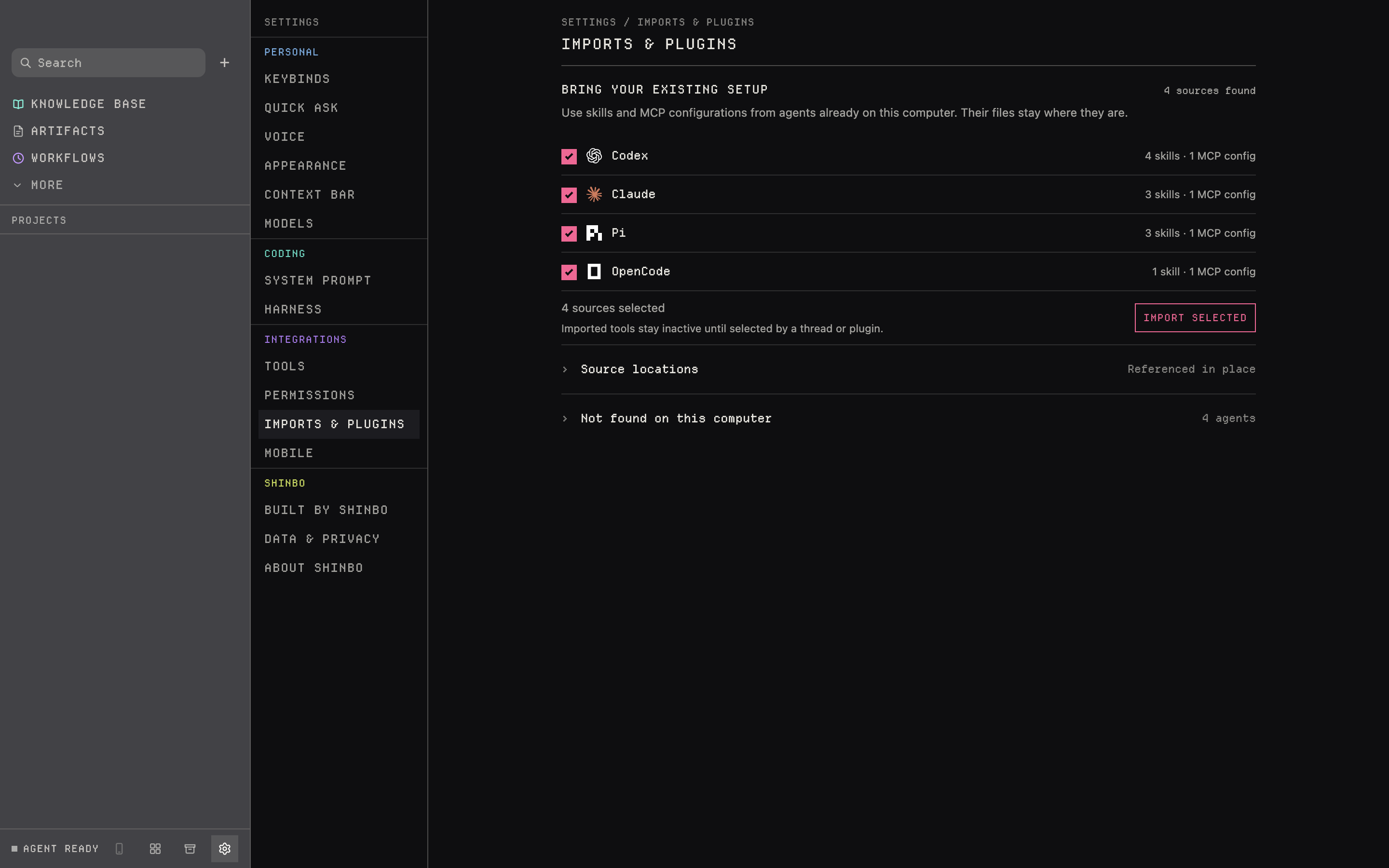
- Run and session memory lasts only while Shinbo is open. Sessions started in another terminal are not tracked.
- Handoffs carry stdout only; write large deliverables to a file and pass the path.
- Each CLI bills through its own account. Shinbo does not measure vendor-side reasoning use.
- cli is ask-gated: in Ask and Accept edits it asks before spawning.
Related: Delegation for Shinbo's own subagents, Tools for skills and MCP, Control for what a run may do on its own.